Showing posts with label technology. Show all posts

Monday, January 3, 2022

Shattered Backboard Glass and the Cat's Eye

"Dad, the basketball backboard is broken."

My 8-year-old son was looking out the back window. I was talking to a friend in our family room, and basketball was the last thing I was thinking about.

"No it's not," I thought as I stood up to investigate. This was August 2019. The backboard was only 2 years old. And that glass is 1/2-inch thick tempered-glass — and crazy heavy! The basketball stand was a splurge purchase when we bought the house in 2017 — over $2000 for a heavy-duty stand with a dunk-ready hoop (since I do so much dunking! haha) plus a net, and light. It's beautiful, really — kind-of a centerpiece in our back yard.

But at that price and age, there's no way it could be broken. Nobody had even been out there playing.

But I was wrong.

Shattered

Wow, not just a little broken — shattered.

Shattered

We immediately noticed that the break seemed to radiate out from a single point:

Shattered

Another view:

Shattered

Looks like something must've hit it.

(But what?)


I emailed the company. They were sympathetic, but they said it was clear that something had struck it, and the warranty didn't apply. They offered a replacement at a small discount.

Something was bothering the engineer in me, though.

I had looked around under the hoop for a rock or some other kind of projectile, and I hadn't found anything.

If the backboard had been struck by something small, like a bullet or a bb or a rock or something, I expected it would have shattered the impact site to powder, even if at a very small point. There was nothing like that.

If it had been struck by something large — a bird? hard throw with a basketball? a softball? — then I would've expected to find some marks on the surface of the glass, or the item itself. There was nothing.

I couldn't let it go.


A few Google searches, nothing useful.

I wrote a pretty long and piqued email to the company, trying to lay out the possible causes and how likely how unlikely it was that it had been struck based on the evidence, and how terrible an experience it would end up being if I had to replace it under those conditions...

But I didn't send that email. It just didn't sit right.

So I went back to Google.

This time, I found something — Nickel Sulfide in Tempered Glass Causes Spontaneous Fracture, by Thomas L. Pane, PE. Ah ha! Mr. Pane describes a case study of my *exact* situation, a pane of tempered glass shatters for no apparent reason.

Here's a comparison of the images, one from his site, and one from my backboard. Notice the distinctive "cat's eyes" pattern at the center of the fracture, two adjacent 6-sided shards.

Cats Eyes

A closer look shows the defect:

Impurity

Turns out, it's a known issue in tempered glass manufacturing.* It's rare, and very hard to prevent or detect. Nickel sulfide is uniquely similar to water in that it's more dense when it is very hot, but as it cools, it wants to convert to a crystal form that is larger/less-dense. A tiny fleck of nickel sulfide in the glass is all it takes.

Tempered glass uses alternating layers of tension and compression to create huge internal pressures which makes the glass very strong. When the glass is first created the nickel sulfide has a hard time forming a crystal due to the high temperatures, and as the glass cools the nickel sulfide can't crystallize due to the high pressures. But once the glass is out in the sun, it can heat up enough to sometimes allow a corner of the nickel sulfide to crystallize. More hot/cold cycles allow the crystal to grow, until the internal pressures on the surrounding glass from the crystal are too high and the glass shatters.

Wow. That was awesome — such a thrill to have such a compelling explanation with hard evidence!

Armed with this info, I went back to the company and they offered to replace the backboard for free if I paid for shipping, which I agreed to, though a little reluctantly since shipping was over $100. Also, the backboard they sent was probably one that failed quality control, it had some discoloration on the lines, so I wasn't thrilled about that either. But I was happy to have my hoop back up and working.

All done

I've kept the cat's eyes on my desk as a reminder of the experience:

Cat's eyes

Since then, I bought a digital microscope, and took a few pictures of the impurity:

Cat's eyes

Here's the top piece, zoomed to 1000x:

Impurity 2

Here's the bottom piece at 40x:

Impurity 3

And the bottom piece at 1000x:

Impurity 3

It's interesting that both halves of the cat's eyes ended up with parts of the crystal.

Hope that helps someone out there.


* See also The Achille Heel of a Wonderful Material: Toughened Glass, an nice dive into the science, sources of nickel in the manufacturing process, etc.

Sunday, June 30, 2013

Google Reader: The shout heard round the internet, and what to do

For everyone who uses Google Reader, you've surely heard that Google is discontinuing it tomorrow. It will be the shout heard round the internet...

Anyway, the most important thing is that you go to this Google Takeout page, log in, then click "Create" archive. After a minute or so you'll be able to download the archive as a .zip file. Supposedly other products will let you import those files.

In the meantime, most people suggest Feedly. I've been using it for a day and it's pretty much the same, with a slightly confusing interface.

Interestingly you authenticate via Google -- basically Feedly asks Google to figure out who you are, then they trust what Google tells them), then it imports all your feeds and read/unread status. More info from Feedly on the whole transition here.

Hope that helps someone.

Sunday, May 19, 2013

DropScript for Mac OS X 10.8 (Mountain Lion)

dropscript.pngAnyone remember and love the old DropScript app by Wilfredo Sánchez?

Well, I found the source code, but it wouldn't compile on my machine, so I played around with it for awhile and got it to work under Mountain Lion.

At this point I'll note that I am *not* a software developer or Obj. C programmer, and only got it to work because I've hung around the platform long enough to know the terms and am able to use Google. There might be stupid stuff in the binary and I wouldn't know it (e.g. artificially limiting it to certain OSes or architectures -- though I did check the source code for URLs, email and IP addresses making sure it isn't overtly doing anything dangerous...).

Anyway, if you're interested in a binary, leave a comment and I'll see if I can help you.

In the meantime, for those who got DropConvert and DropResize scripts from me ages ago that have now broke under Mountain Lion, try these. ;)

Thursday, January 24, 2013

Mystery of the unknown songs is solved!

Okay, none of you are going to remember this, but in the interest of closure --

Many years ago I asked on a blog post to help me identify 7 songs that I got in 1995 in Portoviejo, Ecuador, on a copy of a tape from E. Nielsen, who got it from E. Brinegar. Nobody knew where the songs came from (and I'm pretty sure nobody cared). A couple are elevator music, the others are cheesy new age songs. But they bring back a lot of memories so I wanted to find and own them.

Well, the first few were identified a few years ago, but the remaining 4 were a mystery until today. The latest version of Shazam (iOS app) on my iPhone picked the correct album in < 5 seconds. Previous versions hadn't worked, so something recently has changed. Hooray!

If you're interested:


BeforeSong TitleAlbum (click to view in iTunes)
Unknown_1Through the Wall
Enchantment - Chris Spheeris and Paul Voudouris - 1991
Unknown_2Pura Vida
Unknown_3Golden Days
Unknown_4Victory
Inside the Sky - Steve Haun - 1988
Unknown_5Beginning Again
Unknown_6Can't Look Back
Unknown_7Inside the Sky


Enjoy!

Thursday, October 25, 2012

Random thoughts

My life is officially full — my inbox-of-life has not stopped growing since my son was born. The stack of unanswered emails, unfinished projects, and unread magazines are all simultaneously growing despite my best efforts.

What does one do in this situation? Prioritize! Be sure to do the most important stuff first. As one would expect, blogging is a ways down on that list...

But I've had a bunch of things on my mind lately and I'd like to get them out:
  • The iPhone 5 - Taller, lighter, faster — a miracle of modern engineering. Everything I loved about my old phone, and a bit better.
  • Apple - One of Steve Jobs' earliest mantras was that a brand is about trust. Apple under him never traded that trust for money, and the current management looks to carry on that legacy. There's an example for other companies (and individuals whose name is their brand) to follow.
  • Age - Anybody else notice that they're getting older?
  • Brain - Turns out I got one of the heaviest doses of anyone affected by the CT overdose problem. What are the odds that I get a migraine that looks like a stroke, and my first and only CT scan is an overdose? I've learned that getting an X-ray is like trying to see what's inside your car by putting it in front of a large white sheet, and shooting it full of holes with a machine gun, then looking at where the bullets made it through to hit the sheet. X-rays can burn or kill cells — I had really weird effects for weeks afterward, the effect of burning all that tissue. Cancer can happen when an X-ray happens to hit a piece of DNA just right to mess it up without killing it. Fortunately, I just had an MRI and it came back clean — no signs of brain cancer yet. Good news, though most cells in your brain grow very slowly, so I may have cancer, but might not know it for 10 or more years. By that time, we may have cancer figured out.
  • Obama - Well, I think I was right. Really complicated healthcare reform was passed, but my healthcare costs continue to climb rapidly. Jobs, overall economy, deficits, foreign relations — I mostly hear blame of Bush and other excuses for the current state of affairs. He got Osama, but lost a few planes we didn't know existed. Other than that, most of the news I see about him relate to him hanging out with celebrities.
  • Romney seems troubled. If I were him, I'd feel the same way. As Scott Adams says, "the electorate is full of idiots", and in order to win he has to tailor his remarks to whatever group he's talking to, which when taken as a whole looks almost like a different person talking. That's got to be stressful for a very principled person. But I get the feeling that most people don't want a principled person in office because they've come to distrust all principle. I hope he wins, he's obviously a man who knows how to accomplish his goals, and has the determination to do so, and has an amazing track record. But I also don't expect the election to even be close.

Saturday, January 21, 2012

Choosing a mobile phone

One of the best metrics I can think of for what smartphone to buy is customer satisfaction.

Tuesday, January 10, 2012

What to buy

Mom, Dad, check out thewirecutter.com -- I agree with pretty much everything I've seen on there. Nice summary of the best of what to buy when it comes to electronics.

Via DF, of course.

Wednesday, November 30, 2011

Android phones come with spyware preinstalled?

tickingtimebomb.pngNot exactly sure what all this Carrier IQ stuff (via DF, of course) on Android and Blackberry is about yet, but the smartphone landscape right now reminds me of the middle ages when marauding bands would roam over the countrysides -- "pillage and burn". Castles were principally built for safety during this period, and I imagine they were enviable places to live.

When you choose Android, you're choosing life out in the countryside, free from rules and limitations, but at risk of having 30 guys show up and dragging you out, stealing all your stuff and burning the house down (spy- and malware).

When you choose Apple, you choose life within castle walls. Doors are closely guarded, and the vast grounds are kept neat and friendly. Come and go (i.e. surf the internet) as you please, but home (your phone OS and apps) are by all measures safe. Pretty easy to be happy as long as you trust the lords of the castle.

The question a smartphone buyer has to answer is this: do I feel safe inside castle walls, or imprisoned?

Thursday, November 17, 2011

Friday, October 28, 2011

Nest

Nest thermostats.

We need more design like this.

Tuesday, October 4, 2011

iPhone 4S announced

I'm pretty sure this will be my next phone, so I was excited to read about the new features.

A quick summary:
  • faster (2x)
  • longer battery life
  • new antenna design
  • fancy 8 megapixel camera
  • voice integration (speak your texts instead of typing them, ask it random questions, etc.)
  • location-based reminders ("remind me to feed the dog when I get home")
  • iCloud
  • availability on Sprint


No near-field communication (use your phone as a credit card), no 4G (which is still an ambiguous term), no new form factor, still no data connectivity during phone calls on Verizon, and not waterproof.

So not everything everyone wanted, but overall a very solid upgrade. I can't wait (till I can afford it =).

Thursday, June 2, 2011

Modern Android

A very good review of the Nexus S Android phone.

Love the last paragraph.
Sure, it comes with a whole host of freedoms that I can exercise, like installing a third-party keyboard component to replace the system keyboard, but I didn’t exercise those freedoms because I don’t care, I’m just not that guy. I never themed my Windows installations, never jailbroke my iPhone, never turbocharged my car. I want a phoneputer that just works and lets me pursue my own goals; goals that don’t include being a sysadmin.

Saturday, July 17, 2010

Dyson's Air "multiplier"?

I wonder how well Dyson's new air "multiplier" fan thing actually works?

As an aside, did you know James Dyson is British? I thought he was Swedish for some reason.

Anyway, the air it's blowing is pulled up through the base, presumably with regular fan blades -- I mean, it can't be another "multiplier" in there, right? The multiplier doesn't actually get any air moving in the first place, it's just the way that air gets sucked into the flow-stream. So then the air has to get pushed up, and through that narrow opening and out. So I can't imagine it's any more efficient than a regular fan with the air having to turn all those corners, nor can I imagine it actually moving much air. And based on their drawings I'm pretty sure a regular fan does all that same "multiplication" stuff too.

Still, it does look pretty cool.

(And Shelly wouldn't have gotten her hair caught in one of those. =)

Friday, January 8, 2010

MiniDV loses its voice

I have some bad news for those of you with miniDV camcorders -- our camcorder was stolen back when we lived in Tucson, so this week I'm finally getting around to borrowing one from a friend so i can get the video off the tapes and onto the computer.

Now the bad news-- much of the audio is trashed on some of the tapes, and even the video in a few places. So much for miniDV being a durable format.

It could be dirty heads, though I tried a cleaning tape and it didn't seem to help, and newer tapes worked fine. It could be that this camera is a Panasonic where mine was a Canon, but that's not much consolation if you're looking for a format that will survive companies going out of business or halting production of a particular piece of hardware. It could be that the tapes weren't well cared for, but they've been stored in the camera case, inside the house since the camera was stolen -- not overly humid or hot.

So what format lasts forever? Stone carvings? Engraving on metal plates? I think the lesson we learn is that all of our precious data needs to be maintained -- moved from old media and formats to new ones as the old ones go obsolete.

I wish it weren't so.

Saturday, August 29, 2009

Snow Leopard: First impressions

A few first impressions of Apple's new OS:
  • Easy install. The simplest (and therefore best) install experience I've seen.
  • Snappier. A little, at least -- I haven't really noticed huge increases on anything yet, though. Maybe 10-20%?
  • Weirdness on first run. For the first few minutes, spotlight couldn't find any of my apps -- then a few minutes later it could. System Preferences (under the Apple menu) wouldn't launch, then a few minutes later it would.
  • Keyboard Maestro/Spaces weirdness. Any of my Keyboard Maestro macros that switch spaces occasionally require me to run them twice for them to actually switch. Not sure what's going on there...
  • More disk space! Hmm, where did that extra 10GB come from on my disk? Uh, maybe some of it came from here -- a "GB" represents about 74 MB fewer actual bytes in the count now, so what looks like an extra 10 GB is actually closer to 9 under the old accounting.
  • Scanner. Preview can grab images directly from my scanner.


There doesn't appear to be anything else that's really changed.

One thing I'm really excited about (but haven't seen yet) is in ejecting disks -- the old OS would just basically say, "No, this disk is in use..." SL will actually tell the apps to let go of that disk, and if they won't, it tells you which ones are hanging on. Very nice.

Worth $29? I guess so -- though from what I've seen I wouldn't break any speed limits getting to the Apple store.


UPDATE: My mom tried installing SL and in the middle of the install it seemed to crash, so she force-quit and restarted, only to discover that those steps corrupted the HFS+ disk catalog. Proceed with caution, and make sure you have all your stuff backed up (including those painfully large Entourage databases).

Wednesday, April 29, 2009

The spam that almost got me...

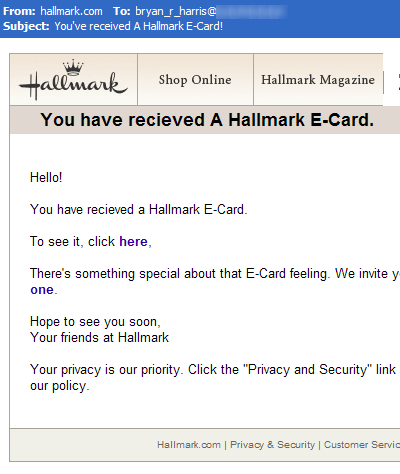
Check out this email I got today at work:

090429-HallmarkEcard.png


I'm pretty cautious, but I just about clicked on the "To see it, click here" link.

It's a good thing I didn't, that link points to a .exe file located on a server named "mail.formens.ro". For those really not into computers, that link points to a Windows "executable", i.e. a program that very likely will do bad things to my computer. Clicking on it could have downloaded and run it (maybe with a dialog box asking me about it, I didn't want to press my luck trying it).

I think what kept me from it was seeing that "received" is misspelled. Misspellings are common in phishing and other spam emails.

The other thing is the link itself. I don't trust *any* emails I get, including the links in them -- especially HTML ones. Again, for the uninitiated, there's really two main types of emails you can receive -- plain text, and HTML formatted. HTML allows you to have formatted text with underlines, bold, multi-colored, etc. text. With plain text, it's just letters and numbers. Links in plain text emails look like this: http://www.amazon.com. In HTML emails, you can make links with pretty much any text, like this. Even worse, if I were malicious, I could make a link that looks like a link to CNN, but takes you to Amazon's webpage: http://www.cnn.com. In this case, the bad guys put a link to a trojan horse (I presume), masked as "here".

So how can you tell? Most email clients (Entourage, Outlook Express, hopefully others) will show you the real url (address) of a link down in the status bar at the bottom of the window when you hover over it with your mouse.* In this case, I did that and immediately saw that the link wasn't at hallmark.com, but at that "mail.formens.ro" site.

If you're not totally sure where the link goes, try to copy the link and paste it into a text editor (TextEdit on the Mac, Notepad on the PC), then if it looks okay, you can copy/paste it into your browser's address bar. That's much safer.

Lastly -- was I worried? A little, I still don't have a replacement Mac at work so I was using a Windows PC. Do .exe files affect Macs? Nope. =) Macs can't natively run those types of files**, so they're not really dangerous.
* Sadly, that does *not* always work with your browser -- malicious websites can fake the text shown in the link on the status bar. Google's search results pages even do little tricks with that text, showing you the bare link you're going to, but really linking to another google url that keeps track of which result you clicked before actually taking you there.

** ... unless you have vmware or parallels installed and run it through there.

Wednesday, January 14, 2009

Steve Jobs on "leave of absence"

Today Steve Jobs announced that his medical problems are "more complex" than he originally thought, and is going on a medical leave of absence until the end of June.

It's a sad day. Truly he's not looking very good, and I can't help but feel my heart go out to him and his family.

Nobody questions that an Apple without Steve Jobs at the epicenter will be different -- in 1997, he was basically tossed (back) onto a bloated, sinking barge*, and somehow managed to rebuild the whole thing into a sleek, giant luxury cruiseliner without sinking it. Amazing.

I've been listening to The Tao of Warren Buffet, a neat little collection of his lessons learned on investing -- which just happen to apply broadly to lots of other stuff in life.**

It's a great book, and has me thinking now: How is this change going to affect Apple as a company? How much does Steve Jobs actually do there? From what I can tell, he generally has a pretty tight grip on the wheel and rudder of the ship, and doesn't hesitate to turn hard sometimes. He's often been found turning against the "winds", and has mostly been right, and that instinct and vision is hard to replace.

You could say that pretty much anything he touches either turns to gold, or gets treated as gold, even long after the shine rubs off. His temporary replacement, Tim Cook, may well have the former, but it'll be a long time before he's earned the latter.

In fact, if you went back 2 years and inserted a Steve-Jobs-to-Tim-Cook transition in 2007 but left all the product announcements and direction from those 2 years intact, I bet half a dozen times since you'd have seen big op-ed pieces declaring Apple's glory days to be over and Tim Cook to be the failed steward of a once great empire. It's human nature to overemphasize imperfections, and when you have a big change like that it's easy to point to that as the cause, regardless of what the upside looks like.

I think it's also important to note that Steve Jobs didn't design the iMac, the iPod or the iPhone -- that was Jonathan Ive. Steve also doesn't build anything, nor does he write software. The guys doing all the design and writing the software and building the hardware are still there, doing it.

In some ways Steve just acts as a giant filter on all the garbage that inevitably gets dreamt up by engineers and designers with caffeine addictions living in Silicon Valley. Probably even from his bedroom he can still do a lot of that.

Me? The stock's down 6%, so I'm thinking of buying some.
* ... that used to be his own cute little yacht, but had a bunch of big ugly shipping containers welded onto the sides by "professional business-people" ...

** I love the one about you getting a car, then being told that it's the only car you'll ever own and it has to last the rest of your life. Any rational person hearing that would realize if it's going to last, they'd better take really good care of it. Well guess what -- that's exactly what we've got with our bodies and minds. Only one of each, and it's got to last.

Oh, and the hood's welded shut so if any of the parts go bad, we'll have to cut through the sheet metal to get to them. =)

Tuesday, November 25, 2008

AppleTV software update

We're on our third AppleTV remote. Apparently having a 2-year old chewing on it isn't within the expected "normal" wear and tear for it.

Software update to the rescue!

The latest update for the ATV seems to let you program almost any remote for it. There's a new option that lets you step through each of the common functions (left, right, select, play, fast-forward, etc.) -- for each one, it tells you to press the button on your remote that you want to perform that action. It couldn't have really been any easier, and now we get to use our TV remote to control our ATV.

Way to go, Apple!

ATV+gremote.png

Sunday, November 9, 2008

PAF on OS X instructions, improved


Yuck.
Although it looks like lots of folks have gotten PAF to run on OS X (intel Macs), the fonts are driving people crazy.

So I played with it for a few minutes. I thought it'd be tolerable, but after a few minutes with it, I have to agree it's a sanity bender.


It looks like a few folks smarter than me have figured out how to make it work, so here's the updated process that seems to get the fonts right. I also try to help out those whose first install didn't work so well:

  1. darwine.pngDownload Darwine (direct link). Darwine (homepage) is a project that tries to mimic the Windows OS for a Windows .exe program. It doesn't work terribly well for most stuff, but it does seem to work for PAF.

    (Different from my last instructions: this is a newer version of Darwine than the one you installed last time; if you installed it before, just quit Darwine if it's running and drag the Darwine folder out of your applications folder to the trash before continuing.)


  2. Install Darwine. Just like every other Mac app out there, double-click the .dmg file, open up the disk image that mounts, and drag the Darwine folder into your Applications folder

  3. Download PAF installer. This is a Windows application that installs the PAF5 application.

    (Different from my last instructions: this is the "all languages" version, which contains a unicode font that you need.)


  4. Install PAF. Open up the Darwine folder (/Applications/Darwine), and drag the PAF5 Setup .exe file you just downloaded onto the WineHelper.app.

    If you previously installed PAF using my earlier instructions, run this program once and click "Remove" when it asks you what you want to do. This will remove the app from the first time around. Then, you should run the PAF installer again, and continue from here.

    Select "English" for the language, then when it asks which "components" to install, select "English" and the "International Unicode Font".

    When the IntallShield asks you where to put PAF, press the "Browse" button, and browse to "Z:\Applications", then change it to read "Z:\Applications\PAF5.2". Don't worry if the PAF5.2 folder doesn't exist, the installer will create it.

    Continue with installation. Also, don't worry if it complains about not being able to find WordPad or NotePad.
  5. Run. To run PAF, go to /Applications/PAF5.2, and drag PAF5.exe to /Applications/Darwine/WineHelper.app.


Much better.
See how much nicer that looks?

I should mention that PAF's future isn't entirely certain. They may be building a web-based PAF, but that's not clear from the vague statements posted to wikipedia and here. If you have money $99 lying around, you might do better to go with Reunion 9 which does more, and which gets tremendous reviews.

Enjoy!

Does anyone read this thing?

views since Feb. 9, 2008